Switching roles in iDMS application. (Service Advisor, Final Inspector, and Floor Supervisor)
Overview

The iDMS application provides a feature that allows users to seamlessly switch between different roles assigned to their user ID. This functionality is particularly useful in cases where a single individual performs multiple responsibilities, such as Service Advisor, Final Inspector, and Floor Supervisor.
Role Switching Functionality
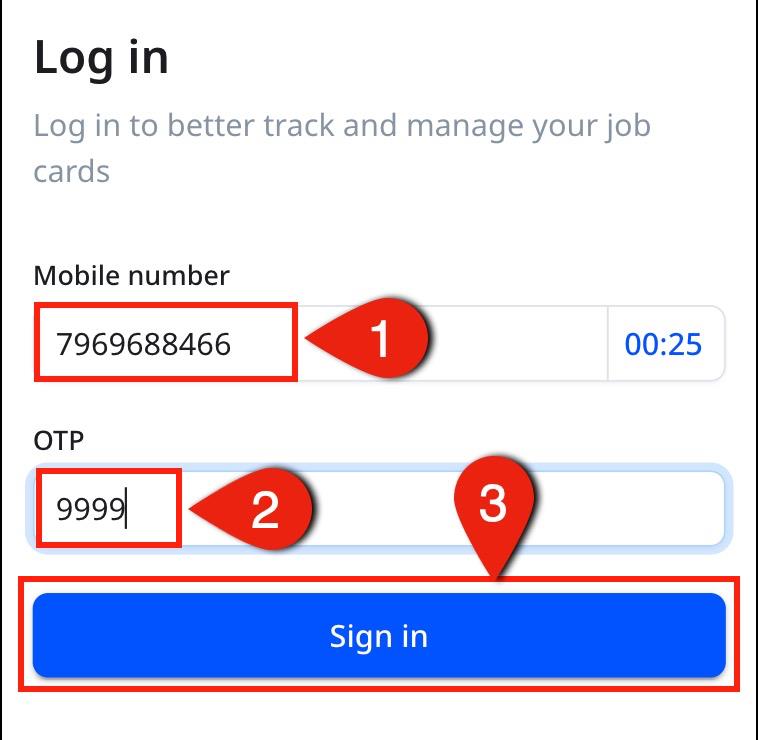
1. Login to the iDMS web application using provided credentials.
2. Navigate to the “Three Dot Menu” option located at the top-right corner of the Dashboard Screen.
3. Under “My Account”, user will find a section labeled “Select Role” or “Switch Role”.
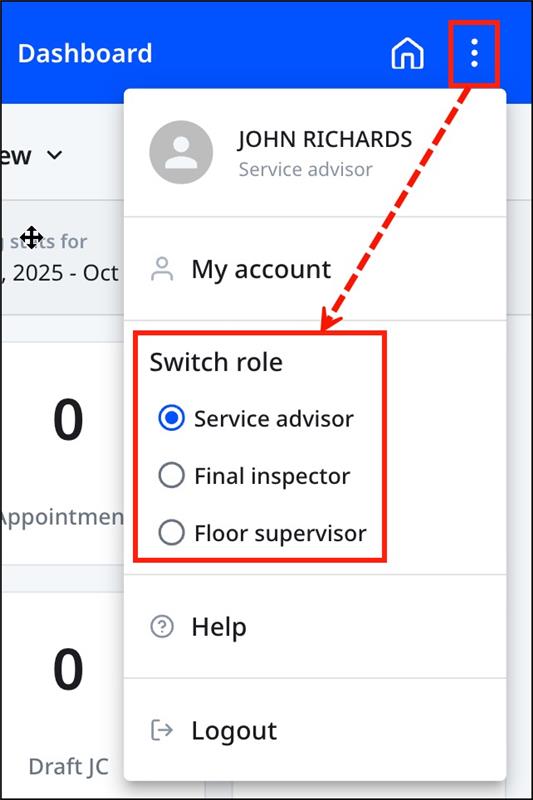
4. From the dropdown list, select the required role:
• Service Advisor
• Final Inspector
• Floor Supervisor
5. Once the role is selected, the application will automatically refresh, and your access rights, menus, and permissions will update based on the selected role.
2. Navigate to the “Three Dot Menu” option located at the top-right corner of the Dashboard Screen.
3. Under “My Account”, user will find a section labeled “Select Role” or “Switch Role”.
4. From the dropdown list, select the required role:
• Service Advisor
• Final Inspector
• Floor Supervisor
5. Once the role is selected, the application will automatically refresh, and your access rights, menus, and permissions will update based on the selected role.
Related Articles
IDMS Application User Guide 0.2.5
Login and Introduction to iDMS Dashboard Let’s get started, To access and use the iDMS platform for vehicle servicing and job card, visit the website at “https://bal-idms.excellonconnect.com/”. This link leads to the login window of the iDMS ...